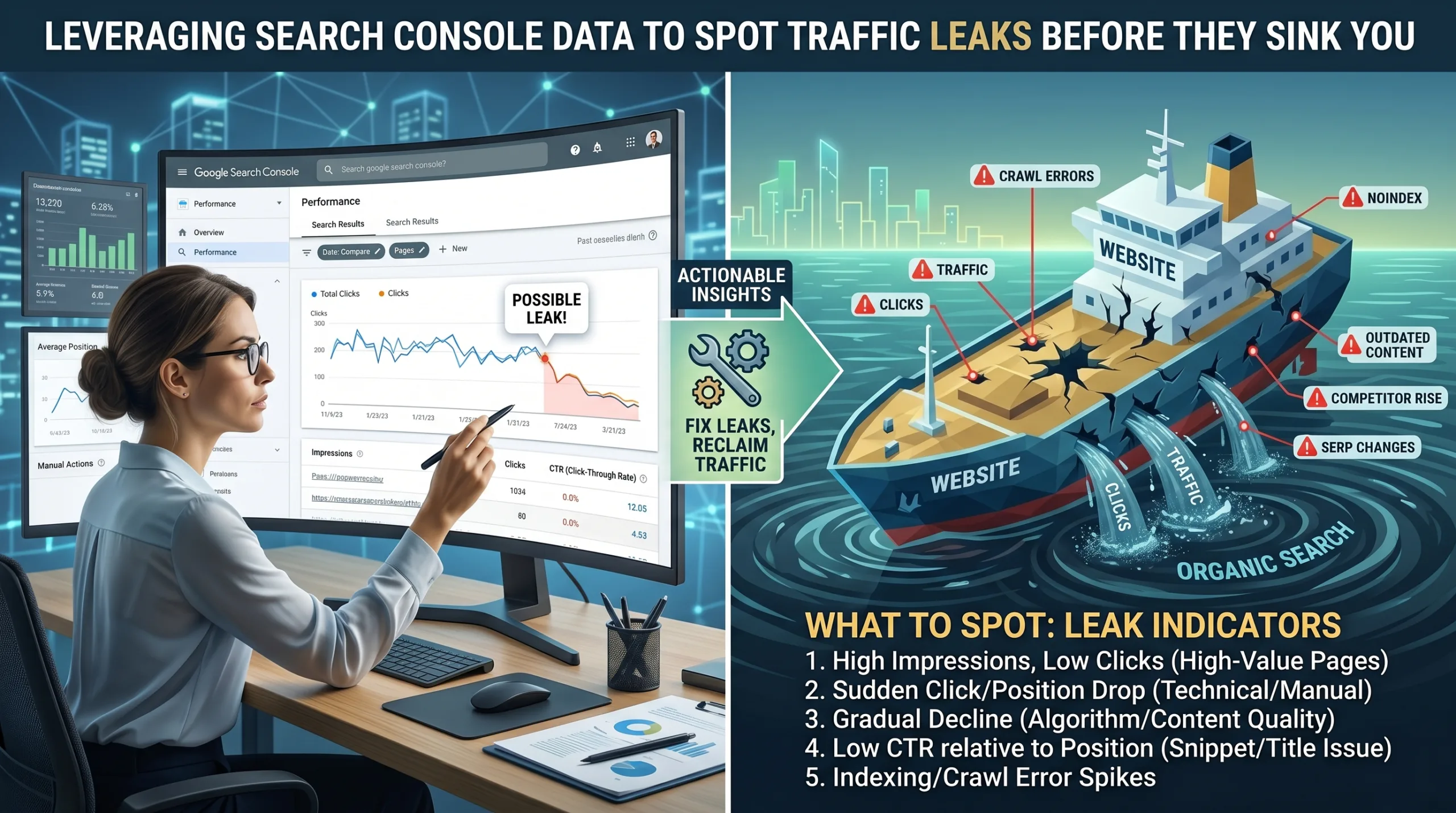
Search traffic rarely disappears overnight. In most cases, websites start showing warning signs weeks or even months before a major decline happens. The challenge is that many website owners fail to notice these signals because they focus only on total clicks and traffic numbers. By the time they realize something is wrong, the damage has already been done.
This is where Google Search Console (GSC) becomes one of the most valuable SEO tools available. It provides direct insights into how Google sees your website and how users interact with your pages in search results. Search Console tracks clicks, impressions, average position, and click-through rates (CTR), helping website owners identify traffic leaks before they become serious problems. According to Google’s Search Console documentation, performance reports allow website owners to monitor impressions, clicks, CTR, and ranking positions to better understand search visibility and performance.
Think of your website as a large ship crossing the ocean. Small cracks below the waterline may not seem dangerous at first. But if those cracks go unnoticed, water slowly enters until the ship starts sinking. Search Console helps you identify those cracks early. The sooner you find them, the easier they are to fix.
Table of Contents
Understanding Website Traffic Leaks
What Is a Traffic Leak?
A traffic leak occurs whenever your website loses potential visitors that should have reached your pages through search engines. Unlike a sudden penalty or website outage, traffic leaks are usually gradual. They happen because rankings slip, click-through rates decline, pages become outdated, or competitors publish better content.
Many website owners focus entirely on rankings. They celebrate when a page reaches the first page of Google and assume the work is finished. Unfortunately, rankings alone do not guarantee traffic. A page ranking in position three with a poor title tag may attract fewer clicks than a competitor ranking in position four with a more compelling headline. This means traffic can decline even while rankings appear stable.
Traffic leaks can originate from several sources. Sometimes Google updates its algorithms. Sometimes competitors improve their content. Sometimes search behavior changes. In 2026, AI-powered search features have significantly altered how users interact with search results, making traffic leak detection even more important. Studies show that click-through rates have dropped in many search results because AI-generated answers satisfy users without requiring them to click through to websites.
Understanding traffic leaks is the first step toward preventing them. Once you recognize that declining traffic is usually the result of many small problems rather than one major disaster, you can begin using Search Console more effectively.
Why Most Site Owners Miss Early Warning Signs
Most website owners check their analytics only occasionally. They notice when traffic increases and become concerned when traffic drops significantly. What they often fail to notice are the subtle trends occurring beneath the surface.
Imagine a page receiving 1,000 clicks per month. If that number declines by only 3% each month, the decrease may seem insignificant. Yet after a year, the page could be receiving hundreds fewer visitors. The decline happened gradually enough that nobody noticed.
Search Console excels at revealing these subtle changes. By comparing date ranges and analyzing performance trends, you can identify pages that are slowly losing visibility. This proactive approach allows you to fix problems before they cause serious revenue losses.
Successful SEO professionals rarely wait for traffic crashes. Instead, they use Search Console as an early-warning system. They monitor changes weekly, track important keywords, and investigate unusual patterns immediately. This habit separates thriving websites from struggling ones.
Why Google Search Console Matters
Key Metrics Every SEO Must Monitor
Google Search Console provides four core metrics that form the foundation of SEO analysis:
| Metric | Meaning |
|---|---|
| Clicks | Number of users who visited your website from Google Search |
| Impressions | Number of times your pages appeared in search results |
| CTR | Percentage of impressions that resulted in clicks |
| Average Position | Average ranking position in search results |
Google confirms that these metrics help website owners understand how often users see their pages and how often they choose to click.
Each metric tells a different story. Clicks measure traffic. Impressions measure visibility. CTR measures attractiveness. Position measures competitiveness. Looking at only one metric provides an incomplete picture.
For example, impressions may increase while clicks decrease. This often indicates that pages are appearing for more searches but failing to attract attention. Alternatively, clicks may remain stable while impressions decline, suggesting stronger performance for a narrower set of keywords.
The true power of Search Console lies in analyzing how these metrics interact with one another.
The Relationship Between Clicks, Impressions, and CTR
Imagine a store located in a busy shopping district. Impressions represent people walking past the store. CTR represents the percentage of people who decide to enter. Clicks represent the actual visitors.
If more people walk by but fewer enter, the problem is likely with the storefront. Similarly, if impressions increase but CTR falls, your search snippets may need improvement.
Google specifically identifies CTR as an important indicator of search effectiveness. A low CTR often means users see your page but do not believe it best answers their question.
Understanding this relationship helps diagnose traffic leaks faster. Rather than guessing why traffic declined, you can identify whether the problem involves visibility, rankings, user interest, or search intent.
Identifying Traffic Leaks Through Search Console
Falling Clicks Despite Stable Rankings
One of the most dangerous traffic leaks occurs when rankings remain relatively stable while clicks decrease. Many website owners ignore this pattern because they assume rankings are all that matter.
In reality, search results have changed dramatically. AI Overviews, featured snippets, People Also Ask boxes, videos, and other SERP features compete for user attention. Studies suggest that even top-ranking results may receive significantly fewer clicks today than they did just a few years ago.
If clicks decline while average positions remain unchanged, investigate the search results themselves. Ask questions such as:
- Have AI Overviews appeared?
- Are competitors using stronger headlines?
- Have new SERP features emerged?
- Has search intent changed?
These factors often explain traffic losses that rankings alone cannot reveal.
Declining CTR Trends
CTR is frequently the first metric to show signs of trouble. A declining CTR may indicate that users no longer find your search listing appealing.
Google recommends sorting pages by CTR to identify underperforming content. Pages with strong rankings but weak CTR often represent quick-win opportunities.
Improving CTR usually involves:
- Rewriting title tags
- Enhancing meta descriptions
- Matching search intent more closely
- Adding compelling value propositions
- Updating publication dates when relevant
Small improvements can produce significant traffic gains because they affect every impression your page receives.
How AI Search Features Affect CTR
AI-generated summaries have become a major factor in modern SEO. Recent studies indicate that AI search features can substantially reduce click-through rates, even for top-ranking pages. Some research suggests position-one CTR can decline dramatically when AI-generated answers appear above traditional organic listings.
This does not mean SEO is dead. It means SEO strategies must evolve. Website owners should focus not only on rankings but also on creating content that earns visibility within emerging search experiences.
Monitoring CTR trends in Search Console helps identify whether AI-driven changes are affecting your niche.
Impression Losses
Impressions often reveal problems before clicks do. A declining impression trend usually indicates reduced search visibility.
Several factors may cause impression losses:
- Ranking declines
- Reduced search demand
- Indexing issues
- Increased competition
- Content becoming outdated
When impressions decline, compare current data with previous periods. Search Console’s date comparison tools make it easy to identify exactly when visibility began falling.
Once the starting point is identified, you can investigate possible causes and take corrective action before traffic losses become severe.
Page-Level Traffic Leak Analysis
Finding Underperforming Pages
Not all pages contribute equally to website performance. A small number of pages often generate most organic traffic.
Within Search Console, sort pages by clicks and compare performance across different time periods. Focus on pages showing meaningful declines. These pages frequently contain hidden opportunities.
Look for patterns such as:
- Falling impressions
- Lower CTR
- Declining average position
- Reduced keyword diversity
When you identify affected pages, review competitor content, update information, improve internal linking, and strengthen topical coverage.
Many traffic leaks can be fixed without creating new content. Sometimes refreshing existing pages produces faster results than publishing new articles.
Tracking Historical Changes
SEO is rarely about single-day fluctuations. Trends matter far more than isolated events.
Successful website owners compare:
- Last 7 days vs previous 7 days
- Last 28 days vs previous 28 days
- Last 3 months vs previous 3 months
Historical comparisons reveal whether declines represent normal fluctuations or genuine problems. Google’s reporting tools support detailed date-range comparisons that make trend analysis easier.
The goal is to identify persistent declines rather than reacting emotionally to every traffic movement.
Query-Level Investigation
Detecting Keyword Declines
Search Console provides valuable keyword-level insights. By examining query reports, you can identify keywords losing visibility.
Suppose a keyword previously generated 500 monthly clicks but now generates only 300. Investigating that decline may reveal:
- Stronger competitors
- Search intent changes
- Outdated content
- New SERP features
Addressing these issues quickly often prevents further traffic losses.
Keyword-level analysis also reveals emerging opportunities. Some queries may show growing impressions but low CTR. These situations indicate untapped traffic potential.
Spotting Search Intent Mismatches
Search intent changes constantly. Users search differently today than they did a year ago.
A page ranking well may still lose traffic if it no longer aligns with user expectations. Search Console helps identify these mismatches by showing the actual queries triggering impressions.
When reviewing query reports, ask:
- Does my content answer these searches?
- Are users seeking information, products, or solutions?
- Has search behavior changed?
Updating content to match current intent often restores lost performance.
Technical SEO Signals Inside Search Console
Indexing Problems
Sometimes traffic leaks have nothing to do with content quality. Technical issues may prevent pages from appearing in search results.
Search Console provides valuable indexing information, including:
- Crawling errors
- Excluded pages
- Indexing failures
- Coverage problems
If important pages disappear from Google’s index, impressions and clicks will inevitably decline.
Regularly reviewing indexing reports helps catch these issues early. Technical SEO may seem less exciting than content creation, but it often has a larger impact on organic visibility.
Mobile Usability Issues
Most searches now occur on mobile devices. A poor mobile experience can negatively affect rankings, engagement, and conversions.
Search Console highlights mobile-related issues that could impact performance. Addressing these problems improves both user experience and search visibility.
Think of mobile optimization as maintaining the foundation of a house. Visitors may admire beautiful interior design, but structural weaknesses eventually create bigger problems.
Regular technical audits ensure that traffic leaks do not originate from preventable usability issues.
Building a Traffic Leak Prevention System
Weekly Monitoring Routine
The best SEO professionals treat Search Console as a routine monitoring tool rather than an emergency resource.
A simple weekly process might include:
- Review clicks and impressions.
- Check CTR trends.
- Analyze top-performing pages.
- Identify declining keywords.
- Review indexing reports.
This process requires surprisingly little time yet provides tremendous value.
Consistent monitoring helps detect problems while they remain manageable. Waiting until traffic drops significantly usually results in longer recovery periods.
Monthly SEO Audit Process
Monthly audits provide a broader perspective. During these reviews:
- Compare month-over-month performance.
- Evaluate content freshness.
- Analyze competitor movements.
- Review technical SEO health.
- Update underperforming pages.
This proactive approach transforms Search Console from a reporting tool into a strategic growth system.
Websites that consistently monitor performance data are better positioned to adapt to algorithm updates, changing user behavior, and evolving search technologies.
Conclusion
Traffic leaks rarely announce themselves loudly. They begin quietly through declining CTRs, slipping rankings, shrinking impressions, or changing search behavior. Left unchecked, these small issues compound over time and gradually erode your website’s visibility.
Google Search Console provides the data needed to identify these problems early. By monitoring clicks, impressions, CTR, and average position, website owners can spot warning signs before major traffic losses occur. Google’s own documentation emphasizes the importance of these metrics for understanding search performance and identifying optimization opportunities.
The websites that succeed in modern SEO are not necessarily those with the biggest budgets. They are often the ones that pay closest attention to their data. Search Console acts like an early-warning radar system, helping you detect traffic leaks before they become disasters.
The sooner you identify a leak, the easier it is to fix. The longer you ignore it, the harder recovery becomes.
FAQs
1. How often should I check Google Search Console?
For most websites, checking Search Console at least once per week is sufficient. Larger websites may benefit from daily monitoring.
2. What metric should I focus on first?
Start with clicks, impressions, CTR, and average position together. Looking at only one metric can lead to misleading conclusions.
3. Why are my impressions increasing but clicks decreasing?
This usually indicates a CTR problem, changing search intent, new SERP features, or increased competition in search results.
4. Can Search Console help recover lost traffic?
Yes. Search Console often reveals the pages, keywords, and performance metrics responsible for traffic declines, making recovery efforts more targeted.
5. Is CTR still important in 2026?
Absolutely. Although AI search features have affected click behavior, CTR remains one of the strongest indicators of how attractive and relevant your search listings appear to users.

1 thought on “Using Search Console to Find Traffic Leaks”